
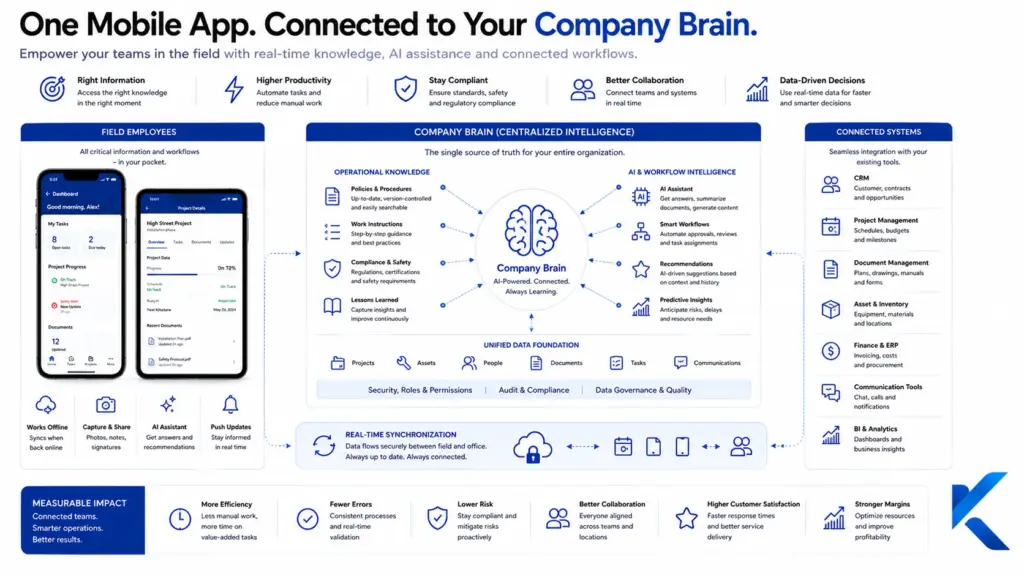
Mobile apps with Company Brain bring operational knowledge directly into field service, installation, maintenance, inspections, and jobsite work. Employees receive task-specific information, guided actions, and documentation support without switching among ERP, document repositories, email, and paper. The result is more consistent execution, fewer routine escalations, and a practical way to preserve experience across the business.
Why does a mobile connection to a Company Brain change daily work?
A large share of midmarket operations happens away from a desk. The decisive work takes place at a customer site, on a production line, inside a mechanical room, in a warehouse, along a roadway, or during an equipment inspection. Those are also the moments when employees often lack the exact information they need: the latest service record, an approved work instruction, a photo from a previous visit, a customer-specific requirement, or a troubleshooting method known mainly by one senior technician.
A conventional business app usually displays records, forms, and document links. A mobile app connected directly to a Company Brain goes further. It combines the current work order with approved company knowledge and prepares that knowledge for the situation at hand. A long technical manual can become a task-specific inspection sequence. Several historical incidents can be summarized into likely failure patterns. Photos, voice notes, measurements, and selected responses can be converted into a structured service record.
The important change is therefore not the addition of another mobile channel. It is the combination of knowledge, workflow, and evidence inside one operational experience. Employees no longer have to reconstruct the context of the job from scattered systems before they can begin productive work.
Where does the greatest value emerge in midmarket companies?
The strongest opportunities appear in processes that repeat frequently but are never identical. Maintenance, troubleshooting, installation, commissioning, acceptance testing, site documentation, asset inspections, quality checks, and technical customer service all follow this pattern. Employees must comply with standards and company procedures while also responding to local conditions, incomplete information, unusual equipment history, and customer constraints.
Mobile devices are already a normal part of work infrastructure. A representative Bitkom survey published in 2026 found that 56 percent of employees in Germany who need mobile communication for work have access to an employer-provided phone. That shift creates a stronger foundation for centrally managed applications, separated business data, controlled updates, and support processes that do not depend on personal devices.
At the same time, field teams are handling more demanding work. In the sixth edition of Salesforce’s State of Service report, 74 percent of mobile workers said their workload had increased and become more complex compared with the prior year. A Company Brain does not remove the operational pressure, but it can shorten information searches, improve handoffs, reduce repetitive documentation effort, and help less experienced employees use established methods more consistently.
This approach is especially valuable when expertise sits with a few individuals, documents are distributed across multiple repositories, or new employees need months of informal coaching before they can handle common variations independently. The app does not replace professional judgment. It gives that judgment a stronger information base at the moment a decision must be made.
How does a mobile Company Brain app work inside an active workflow?
From an architecture perspective, the app is the mobile process layer, while the Company Brain coordinates knowledge retrieval, permissions, business context, and system integrations in the background. When a user opens a work order, the app can pass context such as customer ID, location, asset type, error code, employee role, service history, contract level, and current process step. The Company Brain then determines which information is relevant and permitted for that specific situation.
A typical flow has four connected stages. First, the application loads the work order and approved master data. Second, it provides relevant documents, historical cases, diagnostic prompts, safety notes, and inspection points. Third, it assists the employee while the job is being performed. Finally, it turns voice input, photographs, measurements, selections, and notes into a structured record that can be reviewed and written back to the systems of record.
Retrieval-augmented generation can help the AI component answer questions from approved business sources rather than from general model knowledge. That mechanism is most useful when the response includes the source, revision status, and applicable context. For repeatable and safety-sensitive steps, deterministic workflow logic should complement AI-generated support. The system can suggest, summarize, and prepare; required approvals and professional decisions remain governed by the operating process.
The Company Brain should not become another isolated repository. It needs governed interfaces to ERP, CRM, enterprise content management, ticketing, computerized maintenance management, quality systems, workforce scheduling, and, where relevant, IoT or machine data. For every data object, the organization should identify the authoritative system. The mobile layer should orchestrate the necessary information rather than create competing records.
What information should employees receive at the jobsite?
An effective mobile solution does not maximize the amount of content displayed. It delivers the minimum useful package for the employee’s role, assignment, asset, and current process step. A practical design organizes information around three operational questions:
- What do I need to know? This includes asset history, customer commitments, hazards, approved technical documentation, known failure patterns, prior repairs, and open issues.
- What do I need to do? This covers task sequences, inspection decisions, escalation paths, material guidance, required approvals, and context-specific recommendations.
- What do I need to document? This includes readings, photographs, deviations, signatures, parts used, completion evidence, and follow-up work.
This model prevents the application from becoming a small-screen document archive. A technician replacing a component does not need the entire knowledge base. The technician needs the current instruction for the installed variant, the maintenance history of the affected asset, the required verification step, the applicable customer condition, and the fields that must be completed before the work order can be closed.
The sequence also matters. Showing all instructions at the beginning can overload the user. A stronger design reveals information as the task progresses, while preserving access to source material for unusual cases. This is particularly important in environments where employees wear gloves, work under time pressure, share attention with machinery, or cannot type long messages.
How do conventional mobile apps compare with Company Brain apps?
| Criterion | Conventional mobile business app | Mobile app with Company Brain |
| Information access | Fixed screens, lists, and document links | Context-sensitive selection across multiple approved sources |
| Work guidance | Forms and static checklists | Situation-specific prompts, inspection steps, and recommendations |
| Search | File name, keyword, or record lookup | Semantic retrieval across documents, cases, and operational experience |
| Documentation | Manual entry into predefined fields | Voice, image, extraction, suggested text, and structured prefill |
| Application switching | Users often move among several systems | Relevant information is orchestrated inside one workflow |
| Learning from completed work | Insights often remain buried in reports | New findings can be reviewed and returned to the Company Brain |
| Access control | Usually based on application or module | Also based on role, assignment, asset, customer, and information class |
| Offline operation | Often limited or treated as an add-on | Encrypted job packages and controlled synchronization are designed in |
The central difference is architectural and operational. A Company Brain app is not simply a smaller interface for existing enterprise software. It acts as a task-aware layer between the employee, the work order, the approved knowledge base, and the record produced at the end of the job.
Which use cases are well suited to technical operations?
In field service, the app can prepare the asset history, unresolved findings, parts information, warranty conditions, and earlier root causes before dispatch. At the customer site, technicians can capture readings, document conditions with photos, and follow relevant diagnostic steps. After the visit, the application can draft a service report from the collected evidence for employee review and approval.
For mechanical, electrical, HVAC, and building-services contractors, strong use cases include preventive maintenance, commissioning, inspection records, deficiency reporting, change-order preparation, and equipment handover. The mobile assistant can connect codes, manufacturer documentation, internal procedures, and customer requirements to the installed asset. It should support professional work without presenting itself as a substitute for licensed judgment or required sign-off.
For traffic control, infrastructure inspection, environmental services, and other distributed technical operations, the app can combine permits, work-zone plans, location data, inspection cycles, photographs, and escalation rules. When a deviation is recorded, the workflow can request the required evidence, identify the responsible role, and prepare a follow-up task.
Warehouse and production environments benefit from mobile support for picking, quality inspection, setup changes, incident response, material verification, and shift handoffs. In these settings, speed of interaction matters as much as the answer itself. Guidance has to fit cycle time, physical movement, safety constraints, scanning logic, and the transaction rules of the warehouse or manufacturing system.
Another strong use case is onboarding. New employees can receive step-based guidance for approved task types while still having access to source documents and a defined escalation path. Their questions and recurring difficulties also provide valuable input for improving work instructions, training content, and process design.
How can the application remain useful with unreliable connectivity?
A mobile solution for basements, rural locations, construction sites, warehouses, shielded production areas, or remote infrastructure cannot assume continuous connectivity. Offline behavior must therefore be part of the product design from the beginning. Before a job starts, the app can download an encrypted package containing the work order, relevant master data, selected documents, checklists, asset history, and required forms.
While offline, the user should still be able to view assigned information, complete steps, capture photos, record measurements, and save notes. Resource-intensive knowledge searches and requests for recently changed information may remain limited until a connection returns. Once the device reconnects, the application synchronizes changes, checks versions, applies conflict rules, and sends unresolved conflicts to the appropriate owner.
The user interface should always indicate whether the displayed content is current or locally cached. It should also show whether a completed action has been synchronized successfully. Silent failures are dangerous because the employee may believe a work order, safety finding, or customer signature has already reached the back office when it is still stored only on the device.
Copying the full Company Brain to every phone is usually the wrong approach. It increases storage requirements, exposes more information than the assignment requires, and makes outdated content harder to control. Assignment-specific packages with limited validity, remote revocation, and automatic removal after completion provide a more manageable operating model.
How should privacy, access, and device security be implemented?
Mobile access expands the security boundary to include the device, local storage, camera, microphone, network, operating system, and application distribution process. Identity, device trust, application controls, and data permissions therefore have to work together. Common components include single sign-on, multifactor authentication, role-based access, encrypted transport, protected local storage, session limits, audit logging, and centralized device administration.
Mobile device management or enterprise mobility management can register company devices, enforce operating-system requirements, distribute approved versions, separate business data, revoke certificates, and remove company information from a lost device. When personal phones are allowed, the company should use a managed business container and a written policy covering support, privacy, deletion, monitoring boundaries, and termination of access. Some use cases remain better suited to company-owned devices because of customer confidentiality, regulated data, or operational risk.
The AI layer needs its own controls. Responses should be grounded in approved sources, accompanied by source references, and limited by the user’s role and assignment. The application should not produce binding instructions when the source base is insufficient. Safety-related decisions, customer commitments, technical releases, and compliance judgments should remain with an authorized employee.
Data minimization is also important. The app should not collect a precise location continuously when a one-time arrival confirmation is enough. It should not retain every audio recording when only a transcribed service note is required. Security and privacy improve when the data model is built around the operational purpose rather than around everything the device is technically capable of capturing.
What typically goes wrong in mobile AI projects?
Most failed initiatives do not fail because the app lacks attractive screens. They fail because the actual work was not observed in enough detail. The solution then reproduces existing handoffs digitally, asks for too many fields, supplies information after the decision point, or ignores the physical conditions of the job. A technically impressive product can still become an extra burden for field employees.
Another common mistake is treating a general chat interface as the main product. People at a jobsite usually do not want a long conversation with an assistant. They need the next appropriate action, a reliable source, a fast comparison, a required warning, or a prepared record. Natural-language input is useful for unusual questions and voice capture, but it should not replace purposeful workflow design.
Source quality is another frequent weakness. If several revisions of a procedure remain active, ownership is missing, or outdated documents stay searchable, the Company Brain distributes the existing governance problem more efficiently. Before launch, the organization must address source ownership, validity, review cycles, permissions, and superseded content.
Teams also underestimate synchronization and exception handling. Demonstrations are often performed with perfect connectivity and complete master data. Real operations include canceled work orders, duplicate assets, missing customer records, late schedule changes, device replacement, low battery, damaged cameras, and partial uploads. Those conditions should be tested before the app is relied upon for production work.
Finally, many solutions only deliver information in one direction. They answer questions but do not improve the knowledge base. A useful Company Brain needs a governed return path for new failure patterns, corrections, photographs, workarounds, and employee feedback. Otherwise the mobile layer consumes knowledge without helping the organization maintain it.
How should a practical pilot be designed?
A strong pilot starts with a tightly bounded process in which employees repeatedly spend time searching, documenting, or requesting help. Suitable examples include one maintenance type, a recurring site inspection, a defined commissioning process, or a limited category of service incidents. The process should matter enough to produce measurable value but remain manageable enough for rapid adjustment.
Before development, the current work should be observed in context. Which information is actually used? Where does it come from? Which decisions require experience? Which data is entered more than once? Where do employees wait for a dispatcher, supervisor, engineer, or office administrator? Which steps are skipped when the schedule is under pressure? This process study is more valuable than collecting a long feature wish list.
The initial knowledge domain should remain limited to approved procedures, selected service history, relevant master data, and defined evidence requirements. A small group of users should test the workflow under realistic conditions, including weak connectivity, gloves, background noise, time pressure, incomplete inputs, and unexpected asset variants. Research on digital assistance systems also emphasizes usability, perceived usefulness, and employee acceptance as central adoption factors.
Feedback should be tied to process impact. A request that saves time on every work order deserves different priority from a cosmetic preference or an edge case with a safe workaround. The pilot should also include operational ownership: who reviews new knowledge, who supports users, who handles access changes, and who decides whether the process is ready for broader deployment.
Which measures demonstrate operational value?
Before the pilot, the company should establish a baseline. Useful measures include search time per work order, documentation completeness, calls to dispatch or senior technicians, back-office rework, time from completion to invoice readiness, repeat visits, escalations, error rates, and time until new employees can handle the selected process independently.
The starting point is often less digital than management assumes. A 2024 Bitkom study found that 38 percent of German companies still handled roughly half of their office and administrative processes on paper. A mobile workflow therefore creates limited value when it begins digitally at the jobsite but later falls back into printouts, email attachments, or manual re-entry.
AI use is expanding at the same time. Eurostat reported that 20 percent of European Union enterprises with at least ten employees used AI technologies in 2025. For midmarket firms, this does not mean every process requires an AI program. It means competitive advantage is likely to depend less on having access to AI and more on embedding it into governed, repeatable operations.
The business case should be calculated at the process level. The number of questions asked to the assistant is not a meaningful result by itself. What matters is whether teams complete work faster, prepare more usable records, avoid repeat visits, reduce interruptions of senior employees, improve handoffs, and shorten the path from completed field work to billing or follow-up service.
How can a mobile Company Brain solution scale across the business?
After a successful pilot, the company should not simply distribute the same application to every department. A modular expansion is more effective. Shared services such as authentication, permissions, semantic retrieval, photo capture, voice input, synchronization, audit logging, and integration can be managed centrally. Domain modules can then reflect the needs of field service, installation, inspections, logistics, production, or quality.
Scaling also requires an operating model. The business needs owners for knowledge sources, approval cycles, interfaces, mobile releases, device policies, support, and performance reporting. New content should enter the system through a defined lifecycle: create, review, approve, publish, monitor, revise, and retire.
Reusable workflow components reduce cost without forcing every team into the same process. A photo evidence component can serve several use cases, while required images, naming conventions, retention periods, and approval rules vary by domain. A standard synchronization service can be shared, while the conflict logic for inventory movements differs from the logic for service notes.
The architecture should also make replacement possible. Mobile operating systems, AI models, back-end systems, and vendors will change. Separating process logic, knowledge governance, integration, and user interface reduces dependency on one component and allows the organization to evolve the solution without rebuilding the entire platform.
What are the most practical next steps?
A midmarket company should begin by selecting one process where mobile execution, distributed knowledge, and recurring documentation intersect. The team then maps the required information, roles, decisions, evidence, and system updates. Only after that should it decide which responsibilities belong in the app, which belong in the Company Brain, and which remain in the system of record.
The first production release does not need broad functionality. It needs one complete workflow, trustworthy sources, a reliable write-back path, appropriate security controls, and an interaction model that works under actual job conditions. A narrow but integrated release produces more useful learning than a broad demonstration with no operational endpoint.
Mobile apps with Company Brain can turn company knowledge from a passive repository into an active part of service delivery. Their value appears when employees can act faster, understand the basis for recommendations, document results during the work, and return new experience to the organization. The technology then becomes the mobile knowledge and interaction layer of the operating process rather than a separate tool beside it.
Which sources support the statistics used in this article?
- Bitkom e. V.: “Company Phones Are Becoming Standard”
https://www.bitkom.org/Presse/Presseinformation/Diensthandy-wird-Standard - Salesforce: “State of Service Report, Sixth Edition”
https://www.salesforce.com/service/state-of-service-report/ - Bitkom e. V.: “Four in Ten Companies Operate Mostly Without Paper”
https://www.bitkom.org/Presse/Presseinformation/4-von-10-Unternehmen-arbeiten-papierlos - Eurostat: “20% of EU Enterprises Use AI Technologies”
https://ec.europa.eu/eurostat/web/products-eurostat-news/w/ddn-20251211-2
Which resources provide useful additional guidance?
Further reading
- German Federal Office for Information Security: “Minimum Standard for Mobile Device Management”
https://www.bsi.bund.de/SharedDocs/Downloads/DE/BSI/Mindeststandards/Mindeststandard_Mobile-Device-ManagementV2_0.html - Fraunhofer Institute for Material Flow and Logistics IML: “Digital Assistance Systems in Logistics”
https://publica.fraunhofer.de/entities/publication/29577cb4-e6a6-4fa4-ba52-bb2b79fa26aa - OWASP Foundation: “Mobile Application Security”
https://owasp.org/www-project-mobile-app-security/
Frequently Asked Questions
Does a Company Brain require a native mobile app?
No. Depending on the use case, a responsive web app, a progressive web app, or a native application may be appropriate. The deciding factors are offline requirements, camera and voice access, device security, update distribution, performance, and system integration. Native apps expose more device capabilities but usually require greater development and operational effort.
Which enterprise systems can be connected?
Common integrations include ERP, CRM, document management, ticketing, computerized maintenance management, quality systems, time tracking, scheduling, and IoT platforms. Connections use supported APIs, event streams, middleware, or controlled synchronization. Each data object should have one designated system of record so the mobile layer does not create competing versions of operational truth.
How does information in the Company Brain stay current?
Every knowledge source needs an owner, approval status, review rule, and expiration or replacement process. Changes from systems of record should be synchronized automatically where appropriate. Experience captured in field work should first be structured and reviewed before it becomes a general recommendation available to other employees across the organization.
Can the mobile application work without an internet connection?
Yes, when offline behavior is designed from the beginning. Encrypted job packages can include forms, selected documents, asset data, and required reference information. The app synchronizes when connectivity returns. Large knowledge searches, live inventory, schedule changes, or newly revised procedures may remain unavailable until the device reconnects.
How can invented or unreliable AI responses be limited?
The application should ground responses in approved sources, display references, and trigger a question or escalation when evidence is insufficient. Mandatory inspection steps can use deterministic workflow rules rather than generated text. An authorized employee should continue to confirm safety-related judgments, technical releases, customer commitments, and the action taken.
Can employees use their personal smartphones?
It is technically possible but operationally more demanding. The company needs a managed business container, access controls, selective deletion, support boundaries, and a written use policy. For sensitive customer, asset, employee, or infrastructure data, centrally issued and managed devices are often the lower-risk operating model for both employer and employee.
What data should be included in the first pilot?
Start with a limited, quality-controlled domain: approved work instructions, selected service history, relevant master data, and one defined documentation output. A full enterprise migration is rarely necessary for the first release. It is more important that the chosen process works end to end, from assignment through completion and write-back.
How long does it take to introduce a first mobile solution?
The timeline depends more on source quality, interfaces, security decisions, and process ownership than on the visible app screens. A bounded pilot can be delivered much faster than an enterprise-wide platform. Offline requirements, device management, responsibilities, and success measures should be decided early to prevent avoidable redesign and operational delay.
Which employees should participate first?
Include experienced practitioners, newer employees, and at least one representative from dispatch, process ownership, operations management, or IT. Senior staff reveal exceptions, newer staff expose learning barriers, and operational roles evaluate integration and support. Selecting only enthusiastic technology users often produces an unrealistic assessment of everyday usability and adoption.
How should the financial benefit be demonstrated?
Measure the result against a baseline established before the pilot. Useful indicators include search time, back-office rework, documentation completeness, repeat visits, escalations, invoice readiness, and onboarding time. Qualitative effects such as better handoffs and reduced dependence on individual experts should also be assessed against ongoing support, integration, device, and content-maintenance costs.
All articles about company brain
