
A digital customer interface for heating inquiries collects building data, photos, energy use, documents, and customer priorities during the first contact. Heating contractors can assess, prioritize, and route each request faster. Follow-up questions, internal searches, and avoidable site visits decrease, while customers receive a useful response earlier in the decision process.
Why does so much administrative work begin with the first heating inquiry?
A heating request rarely enters a contractor through one controlled channel. A homeowner may call the office in the morning, send equipment photos through a messaging service later that day, forward an old fuel bill by email, and then use the website form to mention an existing photovoltaic system. The customer sees one project. The contractor receives several disconnected pieces of information.
Prepare service requests more efficiently
KrambergAI helps HVAC and plumbing companies structure customer requests, emergencies, maintenance topics, photos, appointment details and quoting input with AI for more usable handovers.
Implemented pragmatically · Adapted to industry workflows · Made in Germany
This fragmentation becomes especially expensive when the request concerns a heating replacement or heat pump installation. A message such as “I would like a quote for a heat pump” does not provide enough information for a useful initial assessment. The contractor still needs to understand the building, the existing heat generator, annual energy use, heat distribution, domestic hot water demand, renovation history, equipment access, electrical capacity, and possible outdoor-unit locations.
The market context adds pressure. Germany recorded sales of 299,000 heating heat pumps in 2025. That volume does not mean every request will become a profitable project, but it does mean more customer education, more initial screening, and more technical options that heating companies must evaluate with limited office, engineering, and field capacity.
The primary cost is not the first phone call itself. It is the repeated effort that follows: locating attachments, asking the customer for the same information again, determining who owns the request, transferring notes into the field-service or ERP system, and interrupting project managers for basic intake work.
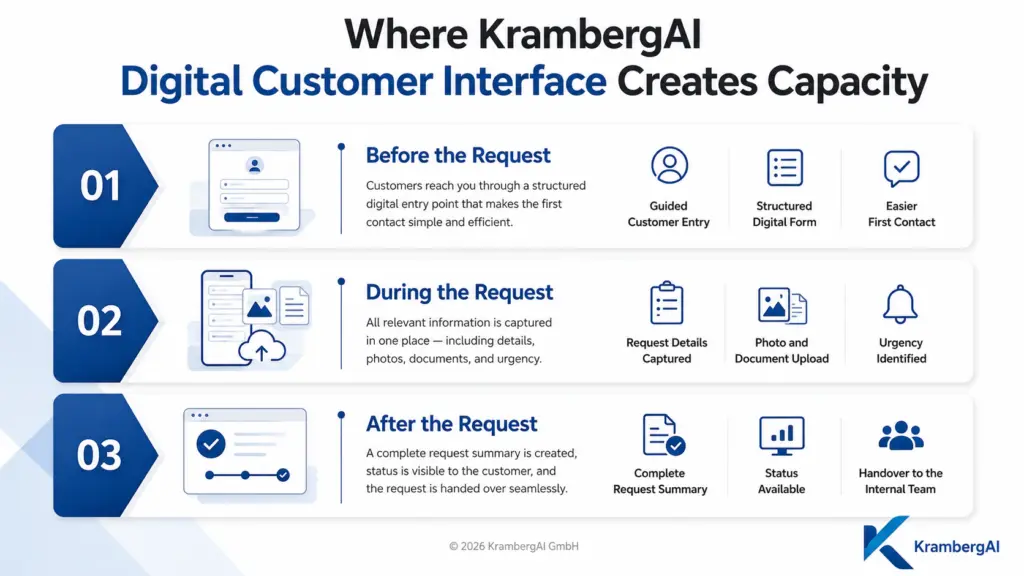
A digital customer interface for heating inquiries addresses this point before the request enters the contractor’s normal workload. It creates one case, connects the customer to the property, and guides the customer through the information the company actually needs for its next decision.
Which information should an online heating request collect?
The interface should not attempt to perform complete system design during customer intake. Its purpose is to gather enough information to classify the request, prepare the first technical review, and choose the appropriate next step. The questions must change according to the request type. A no-heat service call requires a different path from a planned boiler replacement, a heat pump assessment, or a maintenance request.
For a heating replacement, the initial data set generally starts with contact information, the property address, the ownership situation, the building type, construction period, conditioned floor area, and number of units. The customer should then identify the current fuel source, approximate equipment age, annual consumption, and reason for considering a replacement.
Photos are often more reliable than technical form fields. A picture of the equipment label can provide the manufacturer, model, rated output, and manufacturing information without requiring the homeowner to interpret the label. Images of the mechanical room, piping, storage tank, electrical panel, chimney connection, access route, and possible outdoor-unit locations can also help the contractor prepare the next conversation.
The interface should ask how heat is delivered throughout the building. The answer may involve radiators, underfloor heating, fan coils, or a mixed system. The customer may also be able to describe rooms that remain cold, known supply-water temperatures, previous hydronic balancing, recently replaced windows, insulation work, roof improvements, or other renovations.
Additional context can include domestic hot water demand, the number of occupants, an existing solar thermal system, photovoltaics, battery storage, available electrical service, a separate heat-pump meter, and any known utility requirements. Existing floor plans, energy performance certificates, fuel invoices, design documents, or prior contractor reports should be attachable to the case.
Customer-submitted data does not replace a professional heat-load calculation, equipment selection, or site assessment. DIN EN 12831-1 defines a method for calculating room and building design heat loads. The digital request helps organize the inputs and identify missing information, but the contractor remains responsible for the technical analysis and system design.
How should the digital intake experience work for the customer?
The customer should not be presented with a long engineering questionnaire that assumes HVAC knowledge. The interface should begin with the customer’s reason for contacting the business and then display only the questions relevant to that path.
A homeowner reporting a failed boiler should see a short emergency or service workflow. A property owner considering a heat pump should receive questions about building conditions, fuel consumption, emitters, renovation measures, and installation constraints. A property manager may need a separate path for multi-unit buildings, access coordination, tenant communication, and document exchange.
Questions should use everyday language, supported by examples, short explanations, and reference images. When customers do not know an answer, they should be able to select “not known” rather than guess. Requiring an exact model number or supply temperature before the form can be submitted often reduces data quality because the customer enters an assumption simply to continue.
The experience must be designed for smartphones. Many customers will take pictures while standing in a basement, utility room, garage, or outside the building. Uploads must handle modern image formats and large phone photos without failing near the end of the process. Customers should also be able to save progress when they need to locate an invoice or ask another owner for a document.
After submission, the interface should provide a summary, case reference, and realistic next step. That may be a technical review, a callback window, a request for additional documentation, or a scheduling option. A generic “Thank you for your message” screen does not provide enough guidance for a high-value heating project.
The German Central Association for Sanitation, Heating and Air Conditioning demonstrates this operating model through its Serviceportal SHK. Its structured request paths feed into lead management, case status, communication, and further processing. The important design principle is not the specific portal. It is that customer input arrives as an operational case rather than another unstructured email.
How is a digital customer interface different from a contact form?
A contact form digitizes message delivery. A digital customer interface digitizes the beginning of a business process.
| Process area | Basic contact form | Digital customer interface |
|---|---|---|
| Request type | Open-text message with limited routing | Guided selection for repair, maintenance, replacement, heat pump, or project inquiry |
| Building information | Collected later by phone | Requested according to the selected use case |
| Photos and documents | Often limited or disconnected from the customer record | Assigned to the correct customer, property, and case |
| Completeness check | Performed manually after submission | Missing required information is detected before submission |
| Internal routing | Forwarded by email or verbal handoff | Routed to service, dispatch, estimating, sales, or project engineering |
| Customer response | Generic confirmation | Case-specific acknowledgement and defined next step |
| System handoff | Manual copying into field-service software | Structured transfer into CRM, ERP, ticketing, or project records |
| Reporting | Requires manual review of inbox messages | Request categories, processing stages, and drop-off points can be measured |
The difference becomes visible after the customer presses submit. With a standard form, office staff must first interpret and organize the message. With a digital customer interface, the business receives a structured case that can enter technical and commercial review immediately.
How does the inquiry move into the contractor’s daily workflow?
The website experience is only the customer-facing layer. The operational benefit depends on what happens behind it. Each request should receive a case identifier and be associated with a customer and property record. Returning customers should not have to re-enter basic information for every service or modernization request.
The system should first validate the submission. It verifies that essential contact information is present, files can be opened, the property is within the expected service region, and the selected request type matches the provided content. It can then route the case according to business rules.
A no-heat condition may go to service dispatch. A planned heating replacement may go to estimating or project engineering. A maintenance request may enter the scheduling queue. A multi-unit building may require review by a senior project manager. Requests outside the service territory or outside the company’s capabilities can be separated before they consume technical capacity.
The connection to existing contractor software is essential. Customer information, property data, uploaded documents, and request summaries should not require manual re-entry from an email. Depending on the software environment, the connection may use an API, a standard import, an integration platform, or a controlled workflow between systems.
A company can still improve intake before a full integration is available. A central case list with owner, status, due date, documents, and communication history is already better than separate personal inboxes. However, the long-term architecture should avoid creating a second isolated customer database that employees must maintain alongside the ERP or field-service platform.
A practical status model might include received, waiting for customer documents, under technical review, callback scheduled, site visit required, estimate in preparation, customer decision pending, awarded, declined, or outside scope. The exact labels matter less than consistent use and assigned ownership.
Which tasks can be automated and which require an HVAC professional?
Automation works best for repetitive, rules-based activity. Examples include sending an acknowledgement, creating the case, assigning a territory, checking required fields, identifying duplicate customers, attaching files to the correct property, reminding the customer about missing documents, and offering a callback slot.
Document-processing technology can extract suggested values from equipment labels, energy bills, or energy certificates. An AI component can summarize a long customer description, identify references to a failed system, detect missing property information, or flag possible conflicts between written answers and uploaded photos.
These outputs should remain review aids. The system may note that a customer selected underfloor heating while the photos also show radiators. It may detect that the fuel invoice appears incomplete. It may identify the model name on a boiler label. It should not independently approve equipment sizing, determine final eligibility for a funding program, or issue a binding price for a technically unreviewed project.
Professional judgment remains necessary for heat-load calculations, emitter assessment, hydraulic design, domestic hot water sizing, electrical requirements, sound considerations, outdoor-unit placement, controls, commissioning, and estimate approval.
The latest Bitkom research on German trades shows that digital service is already part of normal customer operations. 85 percent of surveyed trade businesses provide at least one digital customer service, 48 percent provide online appointment scheduling, and 76 percent identify time savings as an important benefit of digital applications. The next step is therefore not simply adding another online feature. It is connecting customer information to the full internal workflow.
How does a practical heat pump inquiry work from beginning to end?
A homeowner visits the heating contractor’s website and selects a heating replacement request. The customer indicates that the property currently uses an older oil-fired boiler and that a heat pump should be evaluated. The interface then changes the next questions to match that scenario.
The customer enters the property type, approximate construction period, conditioned area, annual fuel use, domestic hot water arrangement, heat emitters, and known renovation measures. The customer takes photos of the current equipment label, mechanical room, selected radiators, electrical panel, exterior wall, property boundaries, and potential outdoor-unit locations.
An energy bill and available floor plan are uploaded. Information that the customer cannot provide remains marked as unavailable rather than being replaced with an estimate. The interface also asks about access restrictions, adjacent bedrooms, neighboring buildings, existing photovoltaic equipment, and the desired project timing.
When the request is submitted, the system creates a case and assigns it based on postal code, building type, and requested service. The responsible project manager receives a structured summary, original attachments, and a list of missing inputs.
During the initial review, the project manager sees that no design heat load is available and that the customer does not know the normal supply-water temperature. Instead of conducting the entire intake again by phone, the project manager sends a focused request and offers a consultation appointment. The company can then decide whether a preliminary remote review is sufficient or whether a site visit should be scheduled.
The customer receives a more professional experience because the company does not repeatedly request the same information. The contractor gains a reusable project record that can continue through site assessment, load calculation, design, estimating, funding documentation, scheduling, installation, commissioning, and later maintenance.
Heat pump sizing requires coordinated consideration of design heat load, domestic hot water demand, operating concept, and heat distribution. The German Buildings Forum explains that heat load and hot water demand must be determined before selecting and sizing the equipment.
Capture customer requests in a structured way
The KrambergAI Digital Customer Interface guides customers through their request, collects relevant details, files, photos and requirements, and reduces unnecessary back-and-forth before your team can act.
Implemented pragmatically · Adapted to real workflows · Made in Germany
Why do digital intake projects commonly fail in heating companies?
The most common failure is not a specific software limitation. It is the decision to digitize an unsuitable process. Some companies replace their old contact form with a modern-looking interface while leaving the internal workflow unchanged. The result still arrives as unstructured text in a shared mailbox.
Other implementations collect too much information too early. The customer is asked for engineering data that only a trained technician can determine. Every screen contains mandatory fields, there is no save function, and the customer cannot submit the request without guessing. The interface then produces data that appears complete but cannot be trusted.
The opposite approach also fails. A form that asks only for name, phone number, and “new heating system” does not reduce administrative work. The office must call the customer and perform the entire intake again. The channel changed, but the work did not.
Another frequent issue is missing process ownership. If no employee is responsible for reviewing new cases, no internal response expectation exists, and no escalation occurs, the company has created another digital inbox. Customers receive an automated confirmation but do not receive meaningful follow-up.
Rigid automation can also route cases incorrectly. A winter no-heat emergency should not enter the same workflow as an early-stage modernization request. A contracted maintenance customer may require different handling from a prospect outside the service territory. A property manager with several buildings may need another process entirely.
File handling is another practical risk. Modern phone images can be large, labels may be difficult to read, HEIC files may not be supported, and a customer may upload a multi-page bill from a mobile device. If the upload fails at the end of the process, the business may lose both the information and the prospect.
A useful implementation principle is to digitize one high-volume request type from beginning to end before expanding. Intake, ownership, follow-up, scheduling, documentation, and system handoff should work as one process. A broad portal containing several incomplete workflows often creates more administrative effort than a focused solution that employees actually use.
How should a mid-sized heating contractor introduce the interface?
Implementation should begin with the communication channels that customers already use. The review should include the website, phone notes, personal email accounts, shared mailboxes, messaging apps, manufacturer portals, property management requests, referrals, and requests submitted through partner networks.
The business should then choose a pilot use case. Planned heating replacement is often suitable because the company needs substantial preliminary information and the request usually allows time for structured review. A maintenance request may be a better pilot for a company with a large installed base and standardized service packages.
Office staff, dispatch, service technicians, estimators, project managers, and management should agree on the information required for the next decision. Every question should support routing, technical review, scheduling, estimating, or documentation. Fields that do not affect the process should not automatically become part of the first customer contact.
The workflow should be tested with realistic scenarios, not only ideal submissions. Test cases should include an older single-family home, a multi-unit property, missing bills, unreadable photos, an out-of-area customer, a returning maintenance customer, and a no-heat condition.
Testing must continue beyond the customer interface. The team should verify who receives the case, how attachments are displayed, how missing information is requested, how a callback is scheduled, how the customer record is created, and how the case moves into the existing software environment.
After launch, the company should review where customers abandon the process and where employees still ask for information that was supposedly collected online. These patterns show which questions need better wording, which uploads are difficult, and which internal handoffs are not functioning as intended.
Which performance indicators show whether the interface is useful?
The number of submitted forms is not enough. The company should evaluate whether the requests are usable and whether they reduce work in the office.
Relevant indicators include the share of inquiries that contain enough information for initial review, the time from submission to the first personal response, the number of follow-up requests, the administrative handling time, and the percentage of cases that proceed to consultation, site assessment, estimate, or order.
Declined inquiries also provide valuable information. If many requests fall outside the service area, the interface can filter location earlier. If a building type is outside the company’s capabilities, that expectation can be addressed before a project manager reviews the case. If customers often stop after the first response, the next step may be too difficult or too slow.
Employee behavior is another indicator. If staff print submissions, move attachments to local folders, or recreate the same information in handwritten notes, the digital record is not integrated into the real work. The interface delivers value only when the case becomes the working source used by office, technical, and field teams.
How should privacy, security, and access rights be handled?
Heating inquiries can contain names, addresses, property photographs, energy consumption, equipment information, floor plans, invoices, and ownership documents. Some images may show private areas of a home or unrelated personal information. The system should therefore collect only what is necessary for the selected request.
Every field should have an operational purpose. The business should define who may access the data, when the information should be deleted, and which details may be shared with installers, electricians, energy consultants, manufacturers, or funding specialists.
Role-based access is important because service dispatch, project engineering, accounting, management, and external partners do not require identical information. Changes to the case should be traceable, and documents should not be distributed through unsecured public links.
Transmission and storage need appropriate protection. When the contractor uses external form, hosting, automation, cloud-storage, or AI providers, it should review processing agreements, storage regions, subprocessors, retention controls, deletion functions, and access administration.
Article 5 of the General Data Protection Regulation establishes principles including purpose limitation, data minimization, and storage limitation. For a digital heating intake process, this means collecting information for a defined operational purpose and retaining it only as long as needed for that purpose.
A privacy notice by itself is not sufficient. The actual flow from the website through integration services and document storage to the contractor’s operational system must be documented and protected.
When does an online form become an effective customer interface?
An effective digital customer interface for heating inquiries connects customer communication, initial technical review, and internal case management. It does not begin with the visual design of a form. It begins with the contractor’s next operational decision and the information required to make that decision.
When implemented well, the interface reduces office interruptions, supports faster estimating, improves handoffs between customer service and engineering, and gives customers an earlier, more relevant response. It also creates a reusable property and project record instead of a collection of disconnected messages.
The greatest value does not come from automating every decision. It comes from combining structured information, accountable ownership, system integration, professional review, and useful customer communication. That combination turns a general website inquiry into a case the heating business can actually process.
Which sources support the statistics used in this article?
Sources for statistics
Bitkom e. V.: Digitalisierung des Handwerks – Studienbericht 2025
Statistics covering digital customer services, online appointment scheduling, and time savings in German trade businesses.
https://www.bitkom.org/sites/main/files/2026-01/bitkom-studienbericht-handwerk.pdf
German Heat Pump Association: Heat pump sales increased significantly in 2025
Statistic covering German heating heat pump sales.
https://www.waermepumpe.de/presse/news/details/ueber-50-prozent-im-plus-waermepumpen-absatz-steigt-2025-deutlich/
Which additional resources provide useful background?
Further reading
German Central Association for Sanitation, Heating and Air Conditioning: Serviceportal SHK
Industry example covering structured customer questionnaires, lead management, case status, and continued processing.
https://www.zvshk.de/themen/serviceportal-shk
KfW: Heating funding for private residential property owners
Current official information covering the German funding process for eligible heating replacements.
https://www.kfw.de/inlandsfoerderung/Privatpersonen/Bestehende-Immobilie/F%C3%B6rderprodukte/Heizungsf%C3%B6rderung-f%C3%BCr-Privatpersonen-Wohngeb%C3%A4ude-%28458%29/
German Consumer Advice Center: Replacing a heating system step by step
Independent guidance covering planning, system selection, optimization, and implementation.
https://www.verbraucherzentrale.de/wissen/energie/heizen-und-warmwasser/heizung-tauschen-so-gehts-schritt-fuer-schritt-30045
FAQ
Is a digital customer interface useful only for heat pump inquiries?
No. The same approach can support repair requests, maintenance scheduling, boiler replacement, hydronic balancing, heating optimization, and requests from property managers. Each request type should have its own workflow. A repair case needs symptoms and urgency, while a modernization project requires more detailed information about the building, equipment, energy use, and customer objectives.
Does the online heating request replace a personal phone conversation?
It does not replace professional consultation. It prepares the conversation. Before calling, the employee already knows the property, request type, current equipment, and available documents. The discussion can begin with the technical situation and next action rather than repeating names, addresses, fuel types, and other basic information that the customer has already provided.
Which information should always be required?
Only information that is necessary to begin processing should be mandatory. This usually includes contact details, property address, request type, and a brief description. Technical information should remain optional when the customer may not know it. Photos and documents can replace many manual entries while giving the contractor more reliable material for the initial review.
Can customers without technical knowledge use the interface?
Yes, when the questions use everyday language and include practical guidance. Customers should be able to photograph an equipment label instead of transcribing specifications. Reference images, brief examples, and a “not known” option reduce guessing. Technical terminology should appear only where it supports a necessary selection or helps the customer locate the requested information.
Can the contractor prepare an estimate from the online submission?
That may be possible for standardized maintenance or service packages. A heating replacement usually requires additional technical assessment, a design heat-load calculation, review of the emitters, and confirmation of site conditions. The digital request improves estimating preparation, but it should not imply a binding project price before the contractor has reviewed the technical requirements and installation constraints.
Can the interface connect to existing field-service or ERP software?
Many platforms provide APIs, data imports, integration services, or workflow options. The appropriate connection depends on the contractor’s current software. At minimum, customer, property, case, and document data should transfer without repeated manual entry. When a direct integration is unavailable, a structured export or central case-management layer can provide an interim approach.
How should a no-heat emergency be handled?
Urgent service conditions require a shorter and separately routed workflow. The customer should provide the property address, contact availability, symptoms, equipment type, and information about an existing service agreement. The system can prioritize and route the case, but an employee should still assess the actual urgency and determine the appropriate service response.
Which privacy requirements apply to building photos and documents?
Photos from mechanical rooms, basements, garages, or occupied buildings may contain personal or private information. The contractor should explain why the data is collected, restrict access, establish retention periods, and protect transmission and storage. External form, cloud, automation, and AI providers must be included in the company’s privacy, security, and contractual review.
How difficult is it to implement a digital customer interface?
The effort depends more on internal workflows and software connections than on the website itself. A limited pilot for one frequent request type is easier to govern than a complete customer portal. Before launch, the company must define required data, ownership, status handling, customer responses, privacy controls, and handoffs into existing operational systems.
How can a heating contractor measure the financial benefit?
The company should track follow-up questions, handling time, document completeness, response speed, and the movement from inquiry to consultation, estimate, and order. The strongest benefit often appears when project managers, estimators, and office staff spend less time searching for information, re-entering data, and contacting customers for details that could have been collected earlier.
All articles about industry solutions
